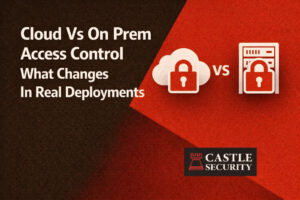
Cloud Vs On Prem Access Control What Changes In Real Deployments
February 10, 2026

If you are pricing a security system this year, the goal is simple: comprehensive protection and genuine peace of mind without paying for features you do not need.
This guide explains how much should security monitoring cost, what drives installation costs and monthly monitoring fees in Australia, which devices deliver the best value, and how to keep long term costs predictable.
When people ask how much should security monitoring cost, they are really asking two questions. What is a sensible monthly fee for monitoring services, and what are reasonable up front system costs for equipment and installation. However In Australia, expect $30–$60 per month for professional 24/7 back-to-base security monitoring, with upfront system costs from $300–$800 for a basic kit or $1,200–$3,000 for a full system with cameras and multiple sensors.
Most Australian households pay between $30–$60 per month for professional monitoring of a home alarm system. The lower end is standard back to base monitoring with basic responses. The upper end adds advanced features such as video verification, dual path communications, and multi property dashboards. If you prefer self monitoring, the monthly fee can be zero, though you may still pay for cloud storage for security camera recordings.
The price of a security alarm system can range from several hundred to several thousand dollars. An average full install for a typical Australian home is commonly around 2,000 to 2,500 when you include a capable control panel, a sensible mix of door and window sensors, one or two motion sensors, and a couple of home security cameras. Wireless security systems generally cost 500 to 1,000 for standard packages. Traditional hardwired systems typically sit between 800 and 1,600 because cabling and wall plates add labour. Installation costs vary with complexity and property size. Professional installation usually costs more than DIY, but it can reduce troubleshooting and false alarms later. A comprehensive security system may lower insurance premiums by up to 20 percent, which offsets some long term cost.
Budget a one time equipment and installation spend that fits your layout and a monthly fee in the 15 to 60 band for professional monitoring. If you choose self monitoring, your monthly outlay can be limited to cloud storage for cameras.
An alarm system is a coordinated set of devices that warn you about intruders and other risks. The basic parts are simple and proven.
You can tailor and customise a home security alarm system with basic or elaborate components based on your needs. Glass break detectors monitor vibrations associated with shattering windows. Flood and smoke sensors extend protection into broader home safety. Start strong with the fundamentals, then add extras.
The control panel is the brain and communications hub of your system. It links sensors, sirens, the mobile app, and the monitoring centre. A modern panel should support dual path communications over broadband and 4G or 5G so your alarm messages still send if your internet drops. The panel manages users and schedules, supports remote access, and often handles smart home integration. When comparing system costs, check that the control panel supports the features you want now and the additional features you may add later. A capable panel avoids premature upgrades.
Door and window sensors are the quiet workhorses that catch the most common entry attempts. They are reliable, inexpensive, and quick to install. Use them on all exterior doors, on ground floor windows, and on upper windows that open to a balcony or roof. Window sensors are among the most cost effective ways to improve coverage without raising monthly fees. If you are renovating, recessed contacts provide a neat finish. In existing homes, surface contacts are fine and extremely easy to fit.
Home security is a layered approach that blends deterrence, detection, and response.
Your aim is comprehensive protection with sensible spending. Many systems allow you to start small and add extra sensors, cameras, and smart features as your security needs grow.
A home alarm system can be unmonitored, self monitored, or professionally monitored.
Many systems include remote access so you can arm and disarm, manage users, and review logs from your phone. If you want hands off reliability, professional monitoring offers the most consistent response. If you prefer control and have time to handle alerts, self monitoring lowers monthly costs.
Security cameras are the eyes of your surveillance system. A thoughtful plan beats a big camera count. Start with two or three cameras in the highest value positions. One at the front door, one watching the driveway or side approach, and one internal camera at a choke point. Choose cameras with night vision, motion detection, and clean apps. Decide between local storage on a hub or network video recorder and cloud storage for easy remote access. Cloud storage is simple and flexible. Local storage avoids monthly fees and keeps footage on site. Both can be cost effective when used well.
If fast, accurate responses are your priority, enable video verification. When the alarm system triggers, the monitoring team receives short clips from your line of sight cameras to confirm whether the event is real. This reduces false dispatches and builds a clearer incident trail.
Back to base monitoring means trained operators are watching for alarms around the clock. They follow your call tree, verify events, and notify the right people. This service is why monthly monitoring fees exist. Standard back to base plans sit in the 15 to 60 range. Costs rise when you add extra communications paths, multiple locations under one account, or advanced analytics and video verification.
Who benefits most from back to base monitoring. People who travel regularly, families who want reliable help overnight, small businesses that need documented responses, and anyone who prefers the assurance of a skilled operator when an alarm sounds at two in the morning.
Advanced technology can make your system easier to use and more effective. It can also raise costs, so pick upgrades for a clear reason.
These features are useful but not mandatory. Choose what you will use consistently and skip features that do not solve a real problem.
Consider extras once the basics are strong.
Additional features should improve security or convenience without adding confusion. Keep it simple so every member of the household uses the system correctly every day.
A well designed system improves home safety and can save money elsewhere. A security system can lower insurance premiums by up to 20 percent, especially when professionally installed and monitored. Visible cameras and good lighting reduce opportunistic break ins.
Smart locks remove the risk of spare keys under mats. Video doorbells help you manage deliveries. Aim for a calm, tidy entry and a system that behaves the same way every day.
Cost effective does not mean cheapest. It means the best value over five or more years.
Follow these principles and your total system costs remain predictable while your protection stays strong.
Let us bring the core facts together so you can budget accurately.
The type of system is the primary driver of cost. A basic alarm that sounds a siren and sends a phone alert is far cheaper than comprehensive systems that include surveillance cameras, smart home integration, and 24 by 7 monitoring services. Installation complexity matters as well. Large homes, multi level layouts, solid walls, or long cable runs add time and materials.
The type of detection devices affects price. Standard door contacts and a motion sensor are inexpensive. Specialty devices such as glass break detectors, outdoor beams, and hardwired window sensors add to the bill. Brand and equipment quality significantly impact cost. Reliable brands last longer, integrate better, and reduce nuisance faults. Finally, location specific factors can influence installation and monitoring, from cellular reception to access and parking.
You have two build styles and three monitoring choices.
Pick the combination that matches your lifestyle. Start with self monitoring if you like, then add professional monitoring later without changing hardware.
Surveillance cameras are common even in basic systems. Choose carefully to get performance that justifies cost.
Add smart home devices when they support the security mission. Smart lights that trigger on motion are practical. Smart locks remove spare key risk and simplify access. Smart plugs help with simulated occupancy. Avoid bloat. Many systems can support dozens of devices, but a lean, well tuned plan delivers better results.
DIY installation can save hundreds on installation costs. Many wireless kits are designed for newcomers with QR codes and templates that make placing sensors extremely easy. Self installs work best in simple layouts, rentals, or when you have time to test thoroughly. Professional installation makes sense when you want neat cable runs, consistent camera angles, and documented testing. Ask for a fixed price. Request a walkthrough that confirms the control panel, every sensor, and each camera are working. Ask the technician to demonstrate remote access, arming modes, and basic troubleshooting so your first week is smooth.
If you manage more than one place, pick a platform that supports multiple locations under one login. You want to view both properties, share access with family or staff, and manage alerts without juggling apps. This capability may lift monthly fees slightly but simplifies life and improves consistency. For small businesses or home offices, use separate user codes and keep clear logs so you can see who armed and when.
Every home is different, but these reference builds help when reading quotes.
Basic system
Balanced family system
Comprehensive systems
Ongoing costs are where budgets drift if you are not careful. Use these habits to stay in control.
Your provider is your long term partner. Look for the following.
Ask for fixed price installation where possible. Confirm what happens during an alarm, who is called first, and how video verification works. Request a demo of the app and remote access. If the answers are clear and timely, you are likely dealing with a reliable team.
Often yes. A basic system with a couple of door contacts and a motion sensor, plus one camera at the door, is a strong start. You can add professional monitoring later if your schedule becomes busier.
Equipment costs are often similar. Wireless saves on installation and is easier to expand. Wired shines during renovations or new builds when cabling is simple to run.
They often do. Choose advanced technology that solves a real problem. If facial recognition or video verification materially improves your daily experience, it is worth it. If it is only interesting, skip it.
Not always. Deploy the alarm first and add cameras later. When you add cameras, place fewer high quality units in the best positions rather than many low quality units.
Often yes. A professionally installed and monitored system can lower premiums by up to 20 percent. Ask your insurer what documentation they require.
Follow these steps and your system will grow with you without surprise costs.
Wireless packages typically run 500 to 1,000, cabling for wired systems is usually 800 to 1,600, and a well balanced Australian home setup often totals 2,000 to 2,500 before monitoring. Professional monitoring sits in the 15 to 60 range per month. Installation costs track property size and complexity, and regular maintenance is part of long term ownership. If you build in layers, choose reputable brands, and keep your plan focused, you will achieve comprehensive protection at a fair price.
If you want a partner who makes all of this easy, talk to Castle Security. Our licensed technicians design, install, and support systems built around your lifestyle. We offer clear, itemised quotes, fixed price installation where practical, and back to base monitoring with responsive local support.
Whether you need a basic system you can grow, a smart home with advanced features, or multi site coverage, Castle Security delivers high quality equipment, excellent customer service, and cost effective monitoring.
Reach out today for a friendly consultation and a tailored plan that protects your home while keeping your ongoing costs sensible.