WA Regulations For Business CCTV: What Perth Businesses Need To Know
March 2, 2026
An integrated security project works when the systems behave like one integrated system, not four separate installs. If your access control systems, cctv cameras, alarm systems, and intercom systems are disconnected, your security personnel lose time during incidents, investigations take longer, and you end up paying twice for ongoing maintenance. A well-designed integrated security systems approach improves operational efficiency, strengthens security posture, and enables automated responses that reduce risk in real time.
At Castle Security, we design integrations for commercial sites, warehouses, and multi-site businesses across WA. This integrations guide for access control cctv alarms intercom covers the common design patterns, the architecture choices that matter, and the testing steps that prevent integration failures after go live.
Integration means different systems can communicate effectively and take coordinated actions based on security events. In practice, a good integrated solution provides:
The benefits of integrating are not just convenience. Integration improves incident response, reduces security breaches caused by slow verification, and lowers operational costs by simplifying monitoring and support.
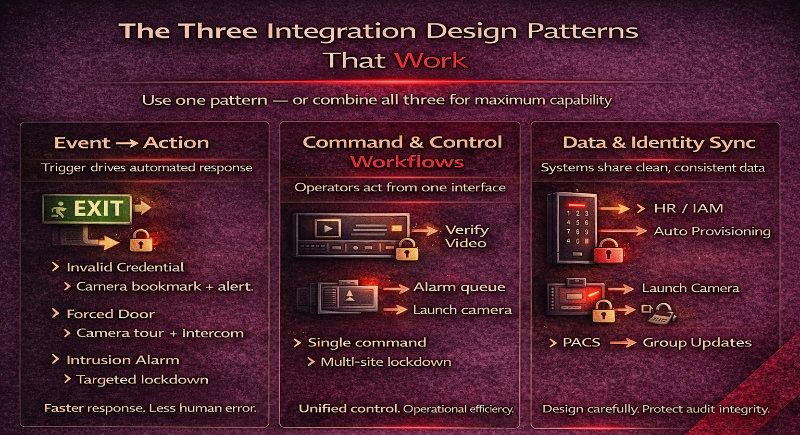
Most successful integrations follow one of these patterns. You can use one pattern or combine them for higher capability.
Event-to-action means a trigger in one system causes an automated response in another. Examples:
This pattern improves speed and reduces human error during high-pressure incidents.
Command/control means operators can take action from a central web interface or single interface. Examples:
This is where a unified platform improves operational efficiency, especially for distributed teams and multi-site operations.
Data sync is about consistent user and device data across systems:
Data sync is powerful, but it must be designed carefully so you do not break audit trails or create phantom authorised personnel.
The system of record is the “source of truth” for identity and permissions. Without this, you get duplicate users, inconsistent entry permissions, and messy incident investigations.
Common choices:
For most commercial sites, access control is the cleanest system of record for user permissions and access rules, while the VMS remains the system of record for video. The key is to define ownership for each dataset so audit and compliance remain reliable.
Alarm workflows should be designed so operators can confirm what is happening quickly.
A strong intrusion workflow typically looks like this:
Alarms can also be configured to trigger when doors are held open, forced open, or when invalid credentials repeat. These automated responses reduce the time between detection and action.
Intercom integration is where visitor access becomes predictable and secure.
A practical intercom workflow:
Video intercom systems allow users to see and hear the person at the other end, adding an extra layer of security. Integrated intercom systems also support real-time communication between areas, which is crucial during emergencies.
Most integration projects break because naming and mapping are inconsistent. If Door 12 is called “Rear Entry” in access control but “Warehouse West” in VMS, your operator UI becomes confusing and slow.
Best practice mapping includes:
This makes security events searchable and reduces operator mistakes during incidents.
Integrations often require licences on both systems:
A common pitfall is building a design that assumes “native integration” without confirming the licensing model. Planning this early prevents cost blowouts and scope disputes.
Identity sync improves operational efficiency, but it can also damage accountability if done poorly.
Good identity design keeps access control as the authority for physical access decisions while still automating the admin workload. Use a model like:
Avoid designs where external systems directly overwrite permissions without governance. That is how you end up with authorised personnel who should have been removed.
Cloud based systems change how integrations are built:
On-prem integrations can be simpler for legacy systems because everything is in the same LAN, but they require more ongoing maintenance and patching. Hybrid architectures often provide the best balance for multiple locations and mixed estates.
If you want the deployment differences explained in detail, connect this guide to Cloud Vs On Prem Access Control What Changes In Real Deployments.
Integrated security increases capability, but it also increases attack surface. Your baseline controls should include:
Network segmentation improves cybersecurity and performance by keeping security technology separate from standard business data. For IP based systems, PoE switching can also simplify installations by combining power and data in a single cable.
A resilient integrated system assumes failures will happen.
Design questions to answer:
A practical resilience approach includes local controller decision-making for access, local video recording where required, and clear operator procedures when one system is degraded.
Video verification is most effective when it is event-linked and fast to review.
Best practices include:
This design improves incident response and reduces false alarms by giving operators immediate context.
Elevator control and interlocks create high-impact security outcomes, but they must be designed carefully:
If you are adding lift control, validate latency, fail-safe behaviour, and emergency rules early so safety and compliance are maintained.
Your operator experience determines whether the integration will be used properly.
A good operator UI includes:
A unified platform reduces training burden and helps security personnel respond faster during live incidents.
These are the issues that cause 80 percent of integration failures:
Synchronising time across all devices ensures logs and events correlate accurately during investigations. It is one of the simplest high-impact fixes you can make.
Not all integrations are equal.
Native Integration means the vendors built and supported the connection. It is usually the simplest and most reliable, provided you confirm version compatibility and licensing.
Middleware means a third platform, such as a PSIM or integration gateway, connects systems together. This can scale well across multiple locations, but it adds complexity and ongoing support needs.
Custom API Work is flexible but it increases maintenance risk. Use it only when the business case is clear and you have a plan for ongoing updates.
A good rule is to choose the simplest integration approach that delivers the required security capabilities with reliable support.
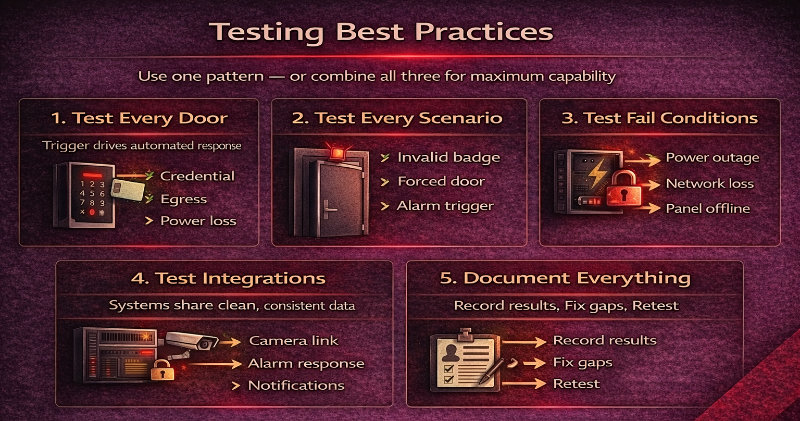
Testing is where integration projects become production-ready.
A practical testing plan includes:
Regular updates and maintenance are critical to keep the integrated system reliable and secure long-term. That includes firmware updates for cameras, controllers, and intercom devices.
A WA commercial site had separate security systems with fragmented incident response. Operators received door alarms in one tool, searched cameras in another, and handled intercom calls separately. Response was slow, and reporting was inconsistent.
Castle Security designed a new integrated system with consistent naming, event-to-action automation, and a single interface workflow. Intercom calls triggered video verification, unlock actions were logged as access events, and intrusion alarms triggered door lockdown and camera tours for fast review. The result was faster incident response, fewer false alarms, and reduced operational costs through simplified monitoring and ongoing support.
Access control is usually the best system of record for identity and access rights, while the VMS is the system of record for video retention and camera health. Define ownership per dataset before integration.
Native integration is vendor supported and typically more reliable. Custom API work offers flexibility but adds maintenance risk and requires ongoing technical expertise.
Often yes. Many integrations require licences on the PACS side, the VMS side, and sometimes on intrusion or intercom platforms. Confirm licensing early to avoid surprises.
Use visual verification with event-linked recording and camera bookmarks, align time sync with NTP, and automate response workflows so operators see context immediately.
Use TLS, certificates, RBAC, secure API key management, VLAN segmentation, and ongoing patching. Integration expands attack surface, so governance matters.
Test every workflow, then test failures: WAN down, VMS offline, server down, and peak load. Confirm that audit trails remain intact and operator UI performance stays usable.
A well-designed integrations guide for access control cctv alarms intercom always comes back to the same principle: define the system of record, choose the right design patterns, map devices consistently, secure the integrations, and test failures before go live. When access control, CCTV, alarms, and intercom systems operate as an integrated security solution, you get faster incident response, better audit trails, lower operational costs, and a secure environment that scales with future growth.
If you want an integration plan that works in the real world, Castle Security can run a site audit, confirm system compatibility, design the workflows, and deliver an integrated system with ongoing support. Contact Castle Security to book an integration design session and get a practical roadmap for access control CCTV integration, VMS integration access control, and unified incident response.